选择 "All Tools" 后新建对话不会自动启用 MCP 工具
在设置里选择了 "All Tools" 作为新对话的默认工具选择,期望是每次新建对话时所有工具都会被自动启用。
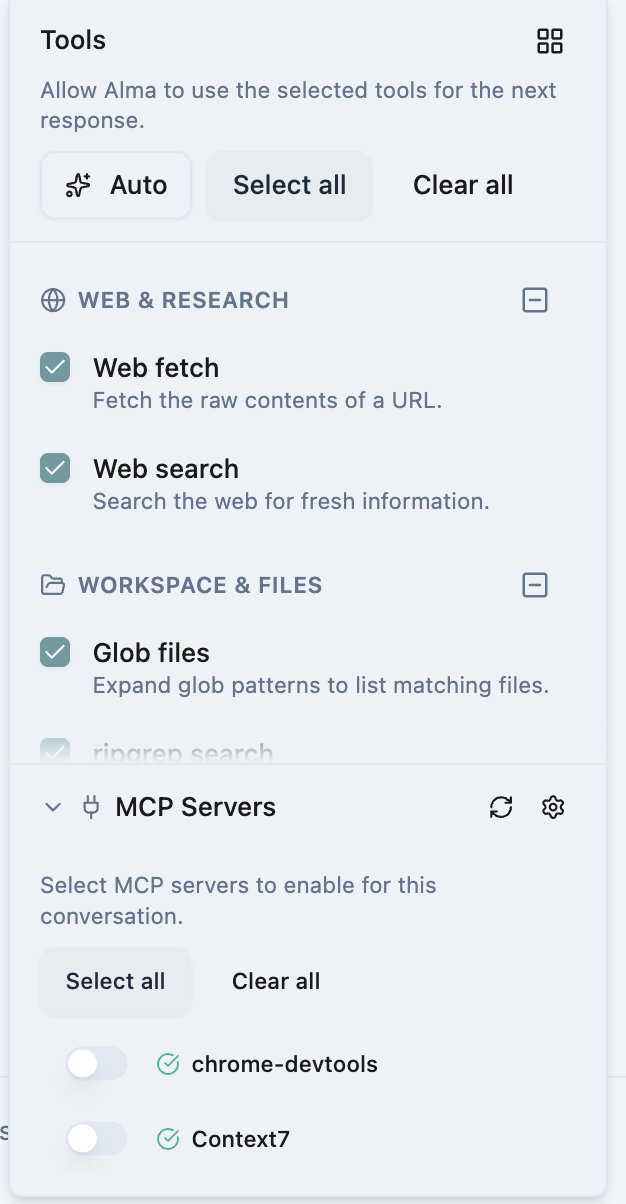
但实际情况是:新建对话后,内置工具(如 Web fetch、Web search、Glob files 等)确实会被自动勾选,但 MCP Servers 下面的工具(比如 chrome-devtools)不会被自动启用,依然是关闭状态。在而chrome-devtools是我高频使用的工具。
这导致每次新建对话都需要手动去勾选常用的 MCP 工具,比较麻烦。
期望行为:选择 "All Tools" 后,新建对话应该同时启用所有内置工具和 MCP 工具。
Please authenticate to join the conversation.
Upvoters
Status
In Review
Board
🐛
Bug Reports
Date
5 months ago
Author

Kyle Qihua Huang
Subscribe to post
Get notified by email when there are changes.
Upvoters
Status
In Review
Board
🐛
Bug Reports
Date
5 months ago
Author
Kyle Qihua Huang
Subscribe to post
Get notified by email when there are changes.